If your product (application, game, database, etc.) is big in size (more than 4 GB), it is not recommended to package it into a single executable file (Setup.exe), because the Windows does not support running executable files larger than 4 GB.
The following errors may occur when attempting to launch such a large file: "Not a valid Win32 application" or "This app can't run on your PC".
Actual Installer has a special feature for packaging large applications: Package Type: Setup EXE + Data available on the General \ Output page. This allows you to generate a small setup exe file and a large data file separately.
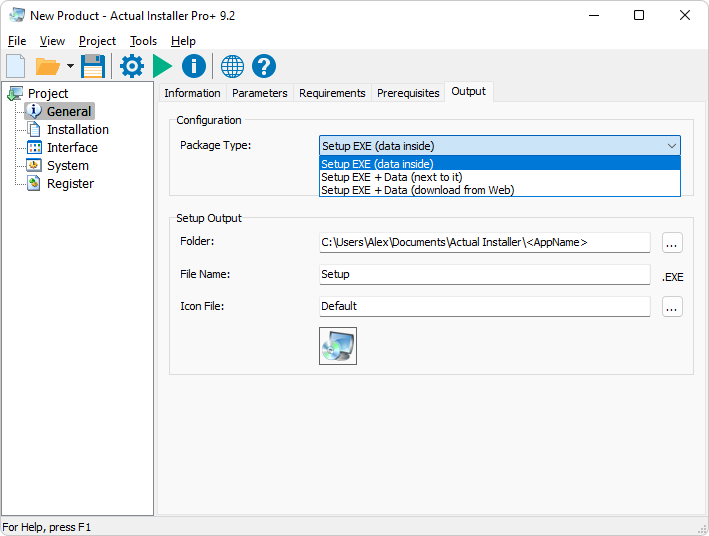
If you intend to deploy your product using external media (a flash drive, CD/DVD), then select the option "Setup.exe + Data (next to it)".
If you intend to deploy your product via your website, then select the option "Setup EXE + Data (download from Internet)". This will create a Web / Online Installer, a small setup file which downloads the remaining application data during installation.
Specify the name for the data file (archive), which must have the extension .ZIP or .7Z, for example: data.zip. When specifing the .7 extention, the LZMA algorithm will be used, which has high compression ratio. The data file will be created in the same folder as the setup exe file.
Go to the Installation / Files and Folders page. In the Source Directory field specify a folder with large data. This folder will be compressed into a data file (archive) using a free utility 7-Zip. During installation, files from the data file will be extracted to your application's installation folder (variable <InstallDir>). To change this location, go to the Advanced page, and specify it in the "Extract parameters for data file" field.
Using the "Add Files" or "Add Folder" buttons, you can add additional files to your installation package. They will be included in the installation package (setup exe file).
Note: for the Uninstaller it is recommended to enable the "Full Uninstallation" option. This will remove all files and folders from the app's installation folder during uninstallation.
After configuring other parameters of your app installation, build your project, and you will get a compact Setup EXE file and a large Data file, ready for deployment.
If you have any questions, please contact us.